API Required Parameters
When using our API, you'll need to specify certain parameters to get the data you want. Swagger provides these requirements for each API. To retrieve data from the context, use the URLSearchParams API:
const searchParams = new URLSearchParams(window.location.search)
Note: You must be in the right context to get accurate data from URLSearchParams . For example, if you are in the context of an account, you will not be able to get the required parameter for a contact(contactId).
Properties automatically provided by httpClient
- x-user-role: The user's role.
- jwt: The user's JWT token.
Swagger displays the necessary properties for each API.
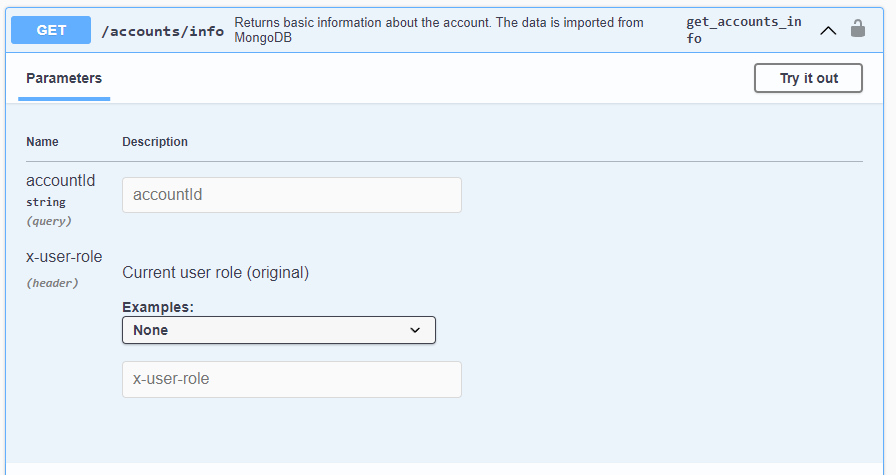
Using accounts/info API:
Since Role and JWT are automatically provided by the httpClient, you only need to provide the accountId.
const searchParams = new URLSearchParams(window.location.search)
const accountIdFromSearchParams = searchParams.get('accountId')
/** Result:  the account id from the url
 * accountIdFromSearchParams='c3633b57f58151588dd0015fb84b0c2d'
 */
Calling the API using httpClient and the required properties.
// From Props::apiUrl: 'https://environment-api-host.invent.us',
  const getAccountInfo = async (accountIdFromSearchParams: string) =>
    await httpClient(`${apiUrl}/accounts/info`, {
      traceId: 'example-trace-id',
      params: {
        queryParams: {
          accountId: accountIdFromSearchParams
        }
      }
    });
    getAccountInfo(accountIdFromSearchParams).then((response) => /** Do something with the response */)
Summary
- All necessary parameters for authentication and authorization are provided by the httpClient.
- The required parameters for each API are available by the URLSearchParams API as long as you are in the right context.