Structure of the Widget Template Repository
This section describes the main structure of the Widget Template Repository:
Details
husky
Husky automates the process of adding Hooks. When the project dependencies are installed, Husky will make sure that all Hooks will be installed in the developer's machine locally for that particular project based on the configs in the package.Details
src
Thesrc folder which contains your working files that will be used later to create the build.Details
webpack
Thewebpack folder is where the build is configured.Details
Readme.md
Widget description and brief instructions on how to make changes to the repository structure.Details
.gitlab-ci.yml
Updates the sources in its directory for the build and runs the commands described in this file. After running the commands, the runner returns the results to GitLab, which can be viewed next to the corresponding commit, on the pipelines tab or jobs tab.Details
package.json
Records important metadata about a project which is required before publishing to NPM, and also defines functional attributes of a project that npm uses to install dependencies, run scripts, and identify the entry point to our package.Details
widget-config.json
All widgets have a configuration file called widget-config.json, where you can find all the basic information about the widget, and which is located in the root directory of the widget template.Readme.md
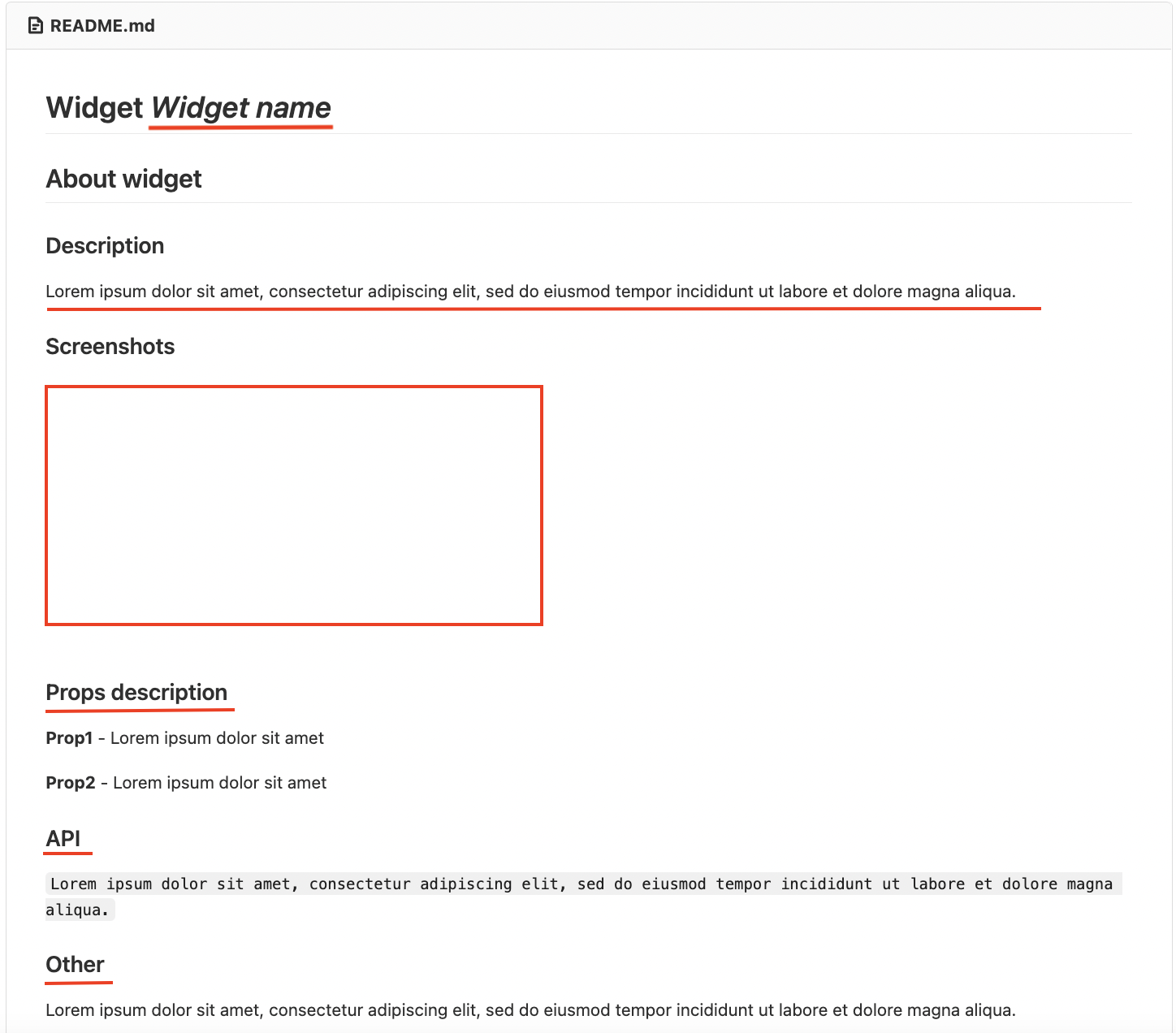
When creating a new widget, in Readme.md file should add the Widget Name, a brief description, screenshots of the widget, a props description, API, and others.
.gitlab-ci.yml
For the Deployment, it needs to be corrected depending on which project the widget is for, for example, a project with semantic release enabled.
include:
  - project: 'gitlab/devops'
    file: '/CI/Node_Widgets.yml'
package.json
In the package.json file, you need to change the name of the package, there are also you can find all the basic dependencies of the widgets and all the commands for building, local development, etc.
widget-config.json
In the widget-config.json file, you need to change the following parameters: name, id, port, and the following important parameters:
"widgetType": 1,
"vendorPrefix": "vendor", // the Vendor name
"tenentSlug": "vendor", // the Vendor name

// Depends on the type of widget.
"exposes": {
    "./Widget": "./src/widget/widget",
    "./WidgetSettings": "./src/widget/widget-settings",
    "./WidgetPreview": "./src/widget-preview/widget-preview"
  },

// Composer Settings (Setup Mode)
"layout": {
    "minW": 5,
    "maxW": 1000,
    "minH": 5,
    "maxH": 1000
  }

// json-settings
"settingsSchema": {
  "uiSchema": {
      "title": { "ui:widget": "InputWidget", "ui:options": {} },

      "apiUrl": { "ui:widget": "InputWidget", "ui:options": {} },

      "titleTooltip": { "ui:widget": "InputWidget", "ui:options": {} },

      "ui:order": ["title", "titleTooltip", "apiUrl"]
    },
    "jsonSchema": {
      "type": "object",
      "required": ["apiUrl"],
      "properties": {
        "title": { "type": "string", "title": "Title" },
        "apiUrl": { "type": "string", "title": "Api URL", "default": "_internal_api_" },

        "titleTooltip": { "type": "string", "title": "Tooltip text" }
      }
    },
  "extraErrors": {}
}
port & id
The port is tied to the GitLab Project ID, which is also the id of your project, meaning that your port number will have the following format, e.g,
your id: 123, therefore your "port": 5123.
widgetType
widgetType is an enum parameter that defines the widget type. It is needed for Widget Store and for host apps. This parameter tells the host app where the widget will be rendered, for example, on the dashboard or outside the dashboard.
There are 3 types of widgets:
- platform (widgetType === 0),
- dashboard (widgetType === 1),
- universal (widgetType === 2) - that fits both.
exposes
| "widgetType" | "exposes" |
|---|---|
| 0 | "./Widget": "./src/widget/widget" |
| 1 | "./Widget": "./src/widget/widget", "./WidgetSettings": "./src/widget/settings", "./WidgetPreview": "./src/widget/preview" |
| 2 | "./Widget": "./src/widget/widget", "./WidgetSettings": "./src/widget/settings", "./WidgetPreview": "./src/widget/preview" |
src
The src folder contains the source code, where main.tsx is for local development without wlabel.
src/components
Components for the widget, not included in UI-kit, such as header, tooltip, etc.
src/local-dev-components
Dashboard imitation, where the widget will be launched. Allows you to check the display of the widget with different themes and different widget settings.
src/placeholder-name
The src/placeholder-name folder contains basic files for development. This folder name and all files should be renamed to the widget name.
placeholder-name-settings.tsx- widget settings form;placeholder-name.tsx- widget itself.placeholder-name.spec.tsx- tests for the widget.styled.ts- styles for the widget.
src/placeholder-name-preview
The src/placeholder-name-preview folder contains the preview icon of the widget in composer. This folder name and all files should be renamed to the widget name. The rest of the widget card content in composer is stored in widget-config.json.
src/templates
The ./templates is the folder where all templates, that is to say, all pages that are created will share the same internal structure (components, header, footer, etc) but different content.
src/utils
The ./utils is the folder where all utility functions and types are stored.
webpack
In the webpack folder, you need to change the build-vars.js file:
module.exports = {
  dev: {
    NODE_ENV: "development",
  },
  dev_federation: {
    host: "http://localhost:5000/", // change 5000 to port from widget-config.json
  },
  prod: {
    NODE_ENV: "production",
    host: "Should be replaced with prod widget URL on CI",
  },
};