Feature Flags
Introduction
Feature flags are a powerful technique that allows developers to modify system behavior without changing code. They are used to enable or disable features and roll out features incrementally.
We store feature flags in CUSTOM_ENV.flags environtment variable. This variable is a JSON object that contains all the feature flags for the application. Flags can be enabled or disabled. If a flag is not present, it is considered disabled.
Installation
To use feature flags in your widget, you need to install the flagged library. Run the following command in your widget repository:
npm install flagged
Add feature flags to the portal
Flags are stored in the CUSTOM_ENV.flags environment variable. You can add or remove flags in the general portal settings.
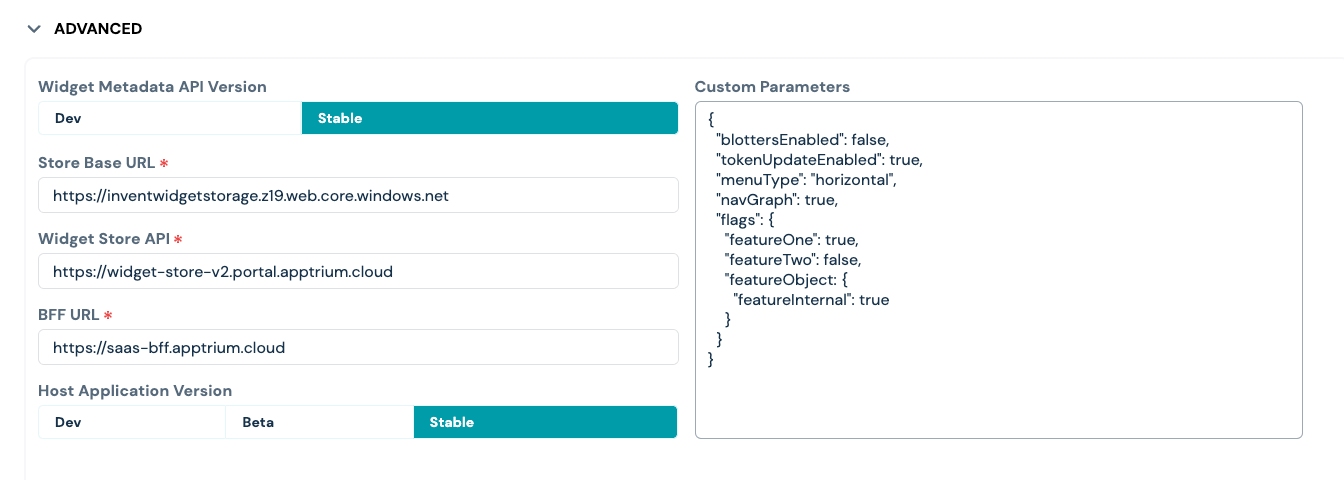
As you can see on the screenshot, you can use nested objects to group flags. For example, you can have a featureInternal flag in the featureObject object. To access this flag in the widget, you need to use the featureObject/featureInternal path.
In wlabel values from this environment variable are added to react context and can be accessed in the widget.
Usage
To use feature flags in your widget, you need to import the flagged library. Tha library provides hooks and render props to work with flags.
Examples:
Using hooks
import { useFeature } from "flagged";

export function Header() {
  const featureOne = useFeature("featureOne");

  return (
    <header>
      {featureOne ? (
        <h1>My App with featureOne</h1>
      ) : (
        <h1>My old boring App</h1>
      )}
    </header>
  );
}
import { useFeatures } from 'flagged';

export function Header() {
	let features = useFeatures();

	return (
		<header>{features.featureOne ? <h1>My App with featureOne</h1> : <h1>My old boring App</h1>}</header>;
	);
}
Using render props
import { Feature } from "flagged";

export function Header() {
  return (
    <header>
      <Feature name='featureOne'>
        <h1>My App with featureOne</h1>
      </Feature>
    </header>
  );
}
or with a function as a child
import { Feature } from "flagged";

export function Header() {
  return (
    <header>
      <Feature name='featureOne'>
        {(isEnabled) =>
          isEnabled ? (
            <h1>My App with featureOne</h1>
          ) : (
            <h1>My old boring App</h1>
          )
        }
      </Feature>
    </header>
  );
}
Conclusion
Use the flags with caution and don't forget to remove them when they are no longer needed.